Showing posts with label Multimedia. Show all posts

Saturday, December 24, 2011

Replay Video Capture 5.32 : Video Capture Untuk Rekam Aktivitas Layar Maupun Webcam

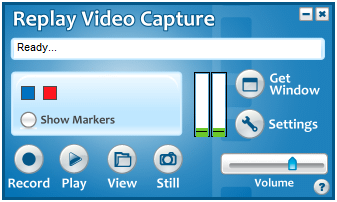
With Replay Video Capture, you can turn anything you see on your PC's screen into a high quality video file you can play anywhere. 
 
Replay Video Capture is especially well suited for recording:
  • Copy Protected Video
  • DVD's
  • Streaming Web Cams
  • Webinars
  • Screen Capture Videos
  • And any other video you can't capture.
High Quality Recordings
Capturing and compressing on-screen video in real time can require a lot of your PC's CPU power. Replay Video Capture is specially designed for this task, as it uses special high quality MPEG-2 codecs that give perfect looking recordings of videos without freezing up your PC.
Convenient
To make it easy to capture a portion of your screen, Replay Video Capture can often automatically locate the region of your screen where video will be played. Or, you can choose to mark an area of the screen manually by moving markers yourself. Either way, setting up your recording area is a snap.
System Requirements
  • Windows XP-SP2, 2000, or Vista (Mac OK with Bootcamp or Parallels installed)
  • CPU Speed: 1.5 GHz minimum (dual core recommended)
  • RAM memory: 512 MB or higher
  • Recommended: Sound Card with a recording line (Stereo Mix, Master Volume, Wave Out Mix, What U Hear or similar)

New with Version 5

  • DVD ready videos: You can now record videos straight to DVD format, ready to be burned on disc. This eliminates hours of conversion or transcoding.
  • Scheduled recordings: Video recordings can now be started automatically at specified times and days.
  • Dual audio recording: Two audio sources can be simultaneously recorded. For example, you can now record your voice over a video with audio track.
  • Dual monitor support: You can use a second monitor to play/record videos while using the first monitor to do other things.
  • Video stills: You can take video snapshots, saved as 32-bit BMP files, while recording or pausing videos, full screen or selected windows.
  • Improved video quality: The new Enhanced mode allows video frames rates up to 50 frames per second. This is particularly important when recording in DVD format.
  • More video codecs and video formats: MPEG-4 and DVD codecs can now be used as default video formats along with MPEG-2 and Windows Media. Replay Video can also use other video codecs already installed in your computer (ffdshow, DivX, Xvid, h264, FLV) and save these files as an AVI.
  • Pause is now available for all video formats.
  • File sizes larger than 4 GB are displayed correctly
  • Replay Video Capture can be used on non-administrative accounts.
Petunjuk Penggunaan KLIK DISINI
Setelah selesai proses instalasi, jangan lupa untuk menutup program, termasuk tray icon software ini yang terdapat di sudut kanan bawah layar. Setelah itu eksekusi patch dari direktori folder tempat software diinstall, lalu copy paste serial yang dihasilkan patch tadi ke register box.

Klik Untuk Keterangan Lebih Lanjut

Tuesday, November 22, 2011

Download Windows 7 Codecs v3.0.5

Windows 7 Codecs bukan nya OS Windows 7 sobat tapi Software sejenis K-lite Codec yang berfungsi untuk memutar Video, MP3 dan lain-lain, Windows 7 Codec v3.0.5 di rielies oleh Shark007 yang menyediakan untuk OS Windows 7. buat sobat yang pake OS Windows 7 ga ada salah nya coba Download software yang keren ini.


Download Windows 7 Codecs v3.0.5


All the codecs you need for Windows 7 to play AVIs, DVDs and more!

It does not contain a media player and it does not associate file-types. With the Windows 7 codec package installed you will be able to use any media player, limited only by the players' capabilities, to play all movies and video clips. Streaming video is supported in several formats in all popular web browsers. Users of the Windows 7 media center codecs have the ability to choose what is installed and where to install it using the public redistributable. After installation you can select to remove specific portions without removing the entire package. You can also re-add the removed items at any time.


Friday, November 11, 2011

ClipGrab: Cara Praktis Download Video / Lagu MP3 Youtube


Berikut ini cara download video Youtube / cara download mp3 Youtube serta berbagai situs lainnya, dan dengan mudah cara download mp3 dari Youtube.
Para pengguna internet tentunya sangat akrab dengan Youtube, situs populer untuk berbagi dan menonton video, baik itu video film (movie), berita, hiburan, termasuk video lagu dan juga video curhat atau konten iseng.
Setelah menyaksikan video tersebut, ada kalanya kita menyimpan atau download video itu ke hard disk PC agar kita bida menontonnya di lain waktu secara offline. Namun sayangnya, Youtube tidak menyediakan fasilitas atau link download video Youtube. Tapi tenang saja, ada banyak cara download video Youtube, dan juga konversi video menjadi mp3, baik dari Youtube atau dari berbagai situs video lainnya, yaitu salah satunya adalah dengan menggunakan aplikasi gratis bernama ClipGrab.
Dari namanya (clip grab), tentu kita langsung tau fungsi software ini yaitu untuk download video Youtube dan situs lainnya. Cara penggunaannya sangat mudah, kita bisa download video dengan cara mencarinya melalui fasilitas search atau bisa juga dengan cara copy-paste link atau alamat URL video tersebut ke kotak link yang disediakan software ini.


Sebagai contoh, misalnya kita ingin menonton dan download lagu Alamat Palsu oleh Ayu Ting Ting :) Kita cukup masukkan keyword “Ayu Ting Ting” dan bila ditemukan lalu ClipGrab akan langsung menampilkan video yang terkait dengan keyword tersebut, dan kita bisa memilihnya untuk kita download.


Selain download video aslinya, ClipGrab juga bisa langsung konversi video menjadi mp3 (dan ke beberapa format lainnya), sehingga kita tidak perlu repot konversi lagi apabila misalnya kita hanya ingin menyimpan lagu mp3 dari video tersebut. Format yang didukung untuk download video adalah format file WMV, MPEG4, OGG Theora, MP3 (audio only), OGG Vorbis (audio only).

ClipGrab bisa download video/lagu dari berbagai situs yaitu YouTube, Clipfish, Collegehumor, Dailymotion, MyVideo, MySpass, Sevenload, Tudou, Vimeo. Selain itu kita juga bisa mencoba situs lainnya, karena pada dasarnya software ini juga akan memeriksa apakah ditemukan file multimedia (audio video) dari link yang kita masukkan, walau pun link itu secara resmi belum disupport. Bila ditemukan, ClipGrab akan memberitahukan bahwa kita bisa download video dari link tersebut.
*

Download Gratis ClipGrab – Video/MP3 Grabber

Software ini merupakan aplikasi cross-platform, tersedia untuk OS Windows, Mac OSX, Linux.
Silahkan langsung download di sini.


Semoga bermanfaat

Sunday, November 6, 2011

Cara Membuka File berekstensi PRC

Awalnya bingung ne waktu mau buka file .PRC, pake adobe reader gag bisa, terus pake PDF reader yang lain juga gag bisa, ternyata ada software khusus buat buka file berekstensi .PRC. Namanya Mobipocket Reader.
Langsung aja silahkan Download disini.

Thursday, October 27, 2011

KaraFun : karaoke player (lirik dan audio) 3000 lagu barat lawas

Ingin berkaraoke ria lewat perangkat komputer teman ? cobalah aplikasi berikut. Software mini ini berfungsi sebagai karaoke player yang dapat memutarkan instrumen audio (tanpa vokal) dan sekaligus menayangkan panduan lirik lagunya seperti layaknya karaoke yang sering dijumpai. File download ini berisi installer + 3000 lagu-lagu barat yang melegenda, berupa file khusus berformat kar yang dapat di putar di KaraFun Player.

Sayangnya banyak koleksi yang ada pada file download ini hanya lagu-lagu oldiest era 70-90an yang mungkin lebih cocok untuk orang tua kita ( kecuali yang baca posting ini memang telah dewasa di era itu haha..) tapi jika teman lebih teliti melihat koleksi playlist nya, akan banyak dijumpai lagu yang ternyata bisa kita nyanyikan dengan baik, karena memang lagu-lagu barat tersebut sangat melegenda, masih sering diputar dan diperdengarkan  baik itu di radio, di acara-acara ( sekali lagi event-nya remaja jadul :P ), atau direcycle penyanyi baru, sampai dengan di jadikan soundtheme iklan televisi (contoh terbaru iklan si motor H*nda Sp*cy dengan "uptown girl" nya)

Setelah kunjungan tiga menit ke website KaraFun, ternyata file installer KaraFun Player yang saya bagikan bukanlah yang terbaru, mereka telah berkembang jauh dari segi lagu yang up to date, kualitas sound instrument nya, sampai dengan sifat bisnis karaoke online nya.

Tetapi jika teman berkunjung kesana dengan berbekal internet download manager, maka kita bisa bawa pulang preview lagu-lagu terbaru (hanya instrumen audio tanpa vokal) yang bisa di "salah gunakan" sebagai nada dering ponsel.

Xilisoft Media Toolkit Ultimate 6.5.3.0310 : 5 in 1 produk Xilisoft yang powerfull


5 program powerfull dikemas dalam satu paket: DVD Ripper Ultimate, Video Converter Ultimate, DVD Copy Express, DVD Creator dan Audio Converter Pro. Xilisoft Media Toolkit Ultimate full version cracked membantu me-ripping, mengkonversi film DVD dan berbagai format video (termasuk video High Definition), menyalin dan backup DVD film, membuat DVD dari berbagai file, mengkonversi dan membakar musik ke CD dari file audio. 


Xilisoft Media Toolkit Ultimate mencakup hampir semua format perangkat multimedia! teman dapat menikmati film DVD, video dan musik pada perangkat PSP, PS3, iPod, iPhone, Apple TV, Zune, Archos, ponsel atau pemain MP4/MP3/DVD/CD. 

Dapat pula melakukan hampir setiap multimedia ripping, konversi dan burning. Semua hanya dengan Xilisoft Media Toolkit Ultimate!


Main Functions:
  • Rip/Convert DVD

    Rip DVD to Nearly All Video and Audio Format
    Rip DVD to AVI, MPEG, WMV, MP4, RM, MOV, 3GP, VOB, FLV, MP3, WMA or any other popular video and audio formats for playback on different multimedia players.
  • Convert video

    Convert Various Video, Audio and Picture Formats
    Convert between HD and general videos like AVI, MPEG, WMV, MP4, H.264/AVC, MOV, MKV, AVCHD, and 3GP; convert pictures to videos; convert video to audio.
  • Copy DVD

    Copy, Clone, Backup and Burn DVD
    Clone DVD movies while preserving the 1:1 ratio; back up DVD-9 to DVD-5 disc; copy DVD movie to ISO file or DVD folder and vice versa; back up DVD to hard disk.
  • Burn video files to DVD movie

    Create DVD from Multiform Videos
    Burn video files (AVI, MPEG, WMV, DivX, and MP4) to DVD movie with personalized DVD menu.
  • Rip/Convert audio

    Convert Between Audio Files, Rip and Burn CD
    Convert audio files like MP3, WAV, and WMA; rip CD to MP3, M4A, WAV, and WMA; burn music CD from MP3, WMA, WAV, AAC and numerous other audio formats.

Key Features:

  • General Video, Audio, and Picture Format Support
    Rips, converts and burns nearly all video, audio and picture files - AVI, MPEG, WMV, DivX, MP4, H.264/MPEG-4 AVC, RM, MOV, XviD, 3GP, FLV, MP2, MP3, WMA, WAV, RA, M4A, AAC, AC3, OGG, JPG, PNG, BMP, and GIF.
  • HD Video Support
    Supports decoding and encoding a wide range of HD video formats - H.264/AVC, MKV, AVCHD (MTS, M2TS), HD Quick Time, HD MPEG2 (TS), HD MPEG-4 TS, HD WMV, and DivX.
  • Various Multimedia Devices Supported
    No need to worry about the compatibility of files and multimedia devices: PSP, PS3, iPod, iPhone, Apple TV, Zune, Archos, Creative Zen, mobile phone, MP4/MP3 players, portable or home DVD/CD players.
  • Batch Conversion and Multithreading
    Automatically detects and supports your CPU for dual-core or multi-core processors to maximize the conversion process.
  • Clip, Merge and Split
    Create custom files from ripping or converting videos - Clip any segment from the source file; merge several small files into one; split one file into several files.
  • Edit Video Settings
    Personalize videos - crop video frame size; change video effect; attach text or picture watermark; add soundtracks; add subtitles while creating DVD movie.
  • A Variety of Output Settings
    Customize video output - Adjust codec, bit rate, frame rate, and sample rate; add background picture and music and topic to personalize DVD menu; edit ID3 tag to categorize video and music files.
  • User-Friendly Interface
    Program interface is clear and intuitive, and all the settings and buttons are easy to recognize and understand.

System Requirements:

  • Microsoft® Windows XP (SP2 or later), Windows Vista, Windows 7;
  • 1GHz Intel/AMD processor or above;
  • 256MB RAM (512MB or above recommended);
  • 100MB free hard disk space for installation (10GB or more for temporary files);
  • Super VGA (800×600) resolution, 16-bit graphics card or higher;
  • Recordable DVD drive.

Sunday, October 16, 2011

UltraISO Premium Edition 9.5.0.2800 Serial Full Version

       Software berbobot ringan dan dengan antar-muka sederhana ini pastilah cukup populer bagi anda yang sering memanfaatkannya untuk memburning file berekstensi ISO yang diduplikasi menjadi CD atau DVD yang bersifat autorun. Anda juga bisa menyalin sebuah media CD autorun ke dalam image file berformat ISO yang nantinya bisa di edit atau di gandakan ke media CD lain.


         Pada pembaharuan kali ini, yaitu menjadi versi update 9.5.0.2800 tidak ditemukan informasi Change-log atau revision history di official websitenya, sehingga saya tidak mengetahui perubahan seperti apa yang terjadi pada UltraISO premium edisi terbaru.
  • Can directly edit the ISO image file.
  • Can directly extract files and folders from ISO image file
  • Can add / delete /create new directory /rename ISO file image content.
  • Can make ISO file from hard disk document.
  • Can create CD/DVD image from CD/DVD-ROM, maintain bootable information.
  • Can process the compact disc boot information, you can directly add/remove/extract boot image of the ISO image.
  • Supports nearly all known CD/DVD image file formats (.ISO, .BIN, .IMG, .CIF, .NRG, .MDS, .CCD, .BWI, .ISZ, .DMG, .DAA, .UIF, .HFS and so on) , and can convert them to the industry standard and widely supported ISO image format.
  • May directly set the file/folder to hidden attribute
  • Supports ISO 9660 Level1/2/3 and Joliet extension
  • Automatically optimizes the ISO image file structure, saves the disc space.
  • Supports the shell document type integration, Open Image files through double clicking them or the Right Click menu of the mouse with the open dialog.
  • The double window user interface is extremely convenient to use.
  • There are rich add-on tools, you can create ALL in 1 bootable compact discs, CD/DVD image file management, even the virtual CD/DVD drive , those functions are really powerful.

Tuesday, October 11, 2011

Cara Mudah Mengedit Video

Bereksperimen dengan file video, bagi beberapa user merupakan hal menarik. Biasanya istilah untuk aktivitas tersebut dikenal dengan sebutan video  editing. Salah satu dari proses editing tersebut adalah memenggal sebagian dari tayangan video, untuk proses selanjutnya. Dari hasil cuplikan tersebut, Anda dapat menggabungkannya dengan file video lainnya untuk presentasi ataupun demo film/video.


Mendapati sebagian cuplikan dari film/video, seperti yang banyak ditemui pada tayangan TV dan Internet, tidaklah sesulit yang dibayangkan user pada umumnya. Karena hal ini dapat dilakukan sendiri dengan menggunakan bantuan aplikasi khusus tentunya. Salah satu aplikasi yang dapat digunakan untuk memotong sebagian dari film/video tersebut adalah Video Cutter.

Aplikasi ini sangat mudah dan sederhana dalam penggunannya, mendukung berbagai format video. Beberapa format tersebut, antara lain MPG, VOB, DAT, AVI, DIVX, MP4, WMV, MOV, MKV, FLV, dan lain sebagainya. Anda hanya perlu menjalankan file video tersebut, kemudian tentukan awal dan akhir dari video yang ingin dipenggal. Dengan mengklik tombol save, hasilnya segera Anda dapatkan.


Ukuran File : 5,91 MB

Merekam dan menjalankan kembali aktivitas penggunaan mouse dan keyboard

Aktivitas rutin penggunaan keyboard dan mouse yang sering dilakukan bahkan berulang peng gunaannya, kini telah dapat direkam untuk dapat dijalankan kembali saat dibutuhkan melalui penggunaan aplikasi yang dikenal dengan Auto Clicker Type.


Aplikasi ini dapat merekam aktivitas apapun yang Anda lakukan, terkait dengan penggunaan keyboard dan mouse tentunya. Kini, Anda tidak perlu lagi mengulangi aktivitas yang sama dalam melakukan pekerjaan, semuanya dapat dipermudah melalui aplikasi ini.

Anda pun dapat menambahkan beberapa kombinasi  shortcut keyboard atau  hotkeys di dalamnya. Tak sulit untuk dapat menggunakannya, Anda hanya perlu menekan tombol  record untuk memulai perekaman, dan tombol  stop untuk menghentikan perekaman. Sedangkan untuk menjalankan ulang aktivitas tersebut kembali, dengan mengklik tombol play. Tiap aktivitas yang direkam, dapat disimpan dan ditambahkan ke dalam sebuah daftar sehingga tiap kali dibutuhkan dapat dipanggil kembali berdasarkan daftar tersebut.


Ukuran File : 1,98 MB

Monday, October 10, 2011

Download Any Video Converter Free

Any Video Converter adalah sebuah tool All-in-One dengan tampilan antarmuka grafis yang sangat mudah untuk digunakan, cepat dalam mengkonversi dan memberikan hasil kualitas video yang baik. Hal ini memungkinkan siapa saja dengan mudah mengkonversi file video dalam hampir semua format video termasuk, DivX, XviD, MOV, rm, rmvb, MPEG, VOB, DVD, WMV, AVI to MPEG-4 untuk perangkat video portabel, MP4 player atau smart phone. Tool ini juga mendukung semua penggunaan format video output.

Download Any Video Converter Free (14,7 MB)

Menggabungkan video dengan Any Video Converter

Banyak cara menggabungkan video diantaranya adalah dengan software Any Video Converter. Caranya sangat mudah silahkan kalian ikuti langkah-langkah dibawah ini :

1. Masukkan (add) video yg ingin digabungkan.
2. Tekan tombol Ctrl lalu kik video yg akan digabungkan.
3. Klik kanan lalu pilih Merge Output seperti gambar dibawah ini


4. Setelah itu konvert videonya mudah bukan tapi jangan lupa setting dulu format video apa yg anda ingnkan.

Untuk hasil yg bagus master videonya juga harus bagus bila tidak maka kemungkinan akan gagal.

Jika anda belum punya software Any Video Conventer
Klik Disini untuk Mendownload.

Thursday, October 6, 2011

SlySoft AnyDVD HD Full | Aplikasi Buat Remove Proteksi CD/DVD

Pada kesempatan kali ini saya akan share aplikasi yang berfungsi untuk meremove/bobol/menghilangkan proteksi CD/DVD/Blue Ray, yakni SlySoft AnyDVD HD 6.8.50 Full. Buat yang sudah request, silahkan langsung di cek.

AnyDVD HD comes with same functionality as AnyDVD, but with additional features for full Blu-ray and HD DVD support, including decryption of Blu-ray (BD+ and AACS) and HD DVD (AACS) movies.

any dvd hd
Features Blu-Ray :
  • Same features as regular AnyDVD
  • Removes encryption (AACS) from Blu-ray media.
  • Removes BD+ copy protection from Blu-ray media.
  • Removes region codes from Blu-ray media.
  • Watch movies over digital display connection, without HDCP-compliant graphics card and without HDCP-compliant display.
  • The "must have" utility for the serious home theater enthusiast using a media center / home theater PC.
  • Provides its own Universal Disk Format (UDF) reader, no need to install 3rd party filesystem. Discs which cannot be read by Windows can be copied using the AnyDVD ripper.
Features HD DVD :
  • Same features as regular AnyDVD
  • Removes encryption (AACS) from HD DVDs
  • Watch movies over digital display connection, without HDCP-compliant graphics card and without HDCP-compliant display.
  • Playback of discs on the PC with PowerDVD Ultra which otherwise do not run.
  • Removes user prohibitions, you can select the language and subtitle track without going through the disc's menu.
  • Removes parental restrictions.
  • Allows you to remove or skip Studio Logos and warning messages.
  • With "magic file replacement™" you can remaster any commercial movie disc using simple XML scripts.
  • The "must have" utility for the serious home theater enthusiast using a media center / home theater PC.
  • Provides its own Universal Disk Format (UDF) reader, no need to install 3rd party filesystem. Discs which cannot be read by Windows can be copied using the AnyDVD ripper.
System Requirements :
  • IBM-compatible PC with a minimum 2 GHz Pentium-class microprocessor and 512 MB RAM
  • Windows 7, Vista, XP, 2000 (32 & 64 bit)
  • 4 MB hard disk space
  • For Blu-ray or HD DVD media, a Blu-ray or HD DVD compliant drive is required.
  • For HD decryption and ripping, the minimum OS is Windows 2000 (latest SP).
  • PC player software usually requires Windows XP SP2 as minumum OS.
Cara install :
Aplikasi AnyDVD HD yang saya share ini sudah full version dan silent install (tidak ada proses/step next, next, and finish), anda tinggal klik 2x file .exe nya dan jalankan aplikasi via shortcut yang ada di desktop, untuk lebih lanjut silahkan anda baca file info.txt. Jangan lupa di uncheck automatic updatenya di bagian setting.

Password : www.remo-xp.com
Download SlySoft AnyDVD HD Full | Aplikasi Buat Remove Proteksi CD/DVD

Tuesday, September 6, 2011

Download K-Lite Mega Codec Pack Terbaru

K-Lite Mega Codec Pack kumpulan dari codec-codec dan tool-tool yang berhubungan dengan codec. K-Lite Mega Codec Pack didesain sebagai solusi yang mudah digunakan oleh para pengguna untuk memutar semua file-file movie anda. Dengan K-Lite Mega Codec Pack anda akan dapat mamutar semua format-format film yang popular digunakan dan bahkan format yang jarang digunakan sekalipun.


K-Lite Mega Codec Pack 7.7.0 (new)

Unduh K-Lite Mega Codec Pack di link dibawah ini:

Fitur-Fitur yang Terdapat pada K-Lite Mega Codec Pack antara lain:
Player:
  • Media Player Classic Homecinema [version 1.4.1.2834]
  • Media Player Classic Homecinema [version 1.2.1008.0]
  • Media Player Classic [version 6.4.9.1 rev. 107]
  • ffdshow [revision 3750]
  • ffdshow VFW interface
DirectShow video decoding filters:
  • XviD [version 1.3.0 build 2010-12-07]
  • On2 VP7 [version 7.0.10.0]
  • MPEG-2 (DScaler5) [version 0.0.8.0]
  • MPEG-2 (Cyberlink) [version 8.4.0.1408]
DirectShow audio decoding filters:
  • AC3/DTS/LPCM (AC3Filter) [version 1.63b]
  • Vorbis (CoreVorbis) [version 1.1.0.79]
  • AAC (MONOGRAM) [version 0.9.6.0]
DirectShow audio parsers:
  • FLAC (madFLAC) [version 1.10]
  • WavPack (CoreWavPack) [version 1.1.1]
  • MusePack (MONOGRAM) [version 0.9.2.0 | 0.4.0.0]
  • Monkey's Audio (DCoder) [version 1.0]
  • OptimFROG (RadLight) [version 1.0.0.1]
  • AMR (MONOGRAM) [version 1.0.1.0]
  • DC-Bass Source [version 1.3.0]
  • AC3/DTS Source (AC3File) [version 0.7b]
 DirectShow source filters:
  • Haali Media Splitter [version 1.10.348.15]
  • AVI splitter (Gabest) [version 1.4.2800.0]
  • MP4 splitter (Gabest) [version 1.4.2800.0]
  • Matroska splitter (Gabest) [version 1.4.2800.0]
  • Ogg splitter (Gabest) [version 1.4.2800.0]
  • MPEG PS/TS splitter (Gabest) [version 1.4.2800.0]
  • FLV splitter (Gabest) [version 1.4.2800.0]
  • RealMedia splitter (Gabest) [version 1.4.2800.0]
  • CDXA Reader (Gabest) [version 1.4.2800.0]
  • MPEG audio splitter (Gabest) [version 1.4.1.2845]
DirectShow subtitle filter:
  • DirectVobSub (a.k.a. VSFilter) [version 2.39.5.3]
  • DirectVobSub (a.k.a. VSFilter) [version 2.33]
Other filters:
  • Haali Video Renderer [version 1.10.348.15]
VFW video codecs:
  • XviD [version 1.3.0 build 2010-12-07]
  • x264 [revision 1867]
  • On2 VP7 [version 7.0.10.0]
  • Lagarith [version 1.3.20]
  • huffyuv [version 2.1.1 CCE Patch 0.2.5]
  • Intel I.263 [version 2.55.1.16]
  • DivX [version 3.11]
  • YV12 (Helix) [version 1.3]
  • MP3 (Fraunhofer) [version 3.4.0.0]
  • MP3 (LAME) [version 3.98.2]
  • AC3ACM [version 1.5]
  • Vorbis [version 0.0.3.6]
  • DivX WMA [version 4.2.0.0]
Tools:
  • Codec Tweak Tool [version 4.7.3]
  • Win7DSFilterTweaker [version 4.0]
  • MediaInfo Lite [version 0.7.41]
  • GSpot Codec Information Appliance [version 2.70a]
  • VobSubStrip [version 0.11]
  • GraphStudio [version 0.3.2.0]
  • Haali Muxer
  • FourCC Changer
  • Bitrate Calculator
Fitur Terbaru:
  • Updated Media Player Classic Home Cinema to version 1.4.1.2834
  • Updated ffdshow to revision 3750
  • Updated DC-Bass Source to version 1.3.0
  • Updated x264VFW to revision 1867
  • Updated Codec Tweak Tool to version 4.7.3
  • Updated MediaInfo Lite to version 0.7.41
  • Minor changes


Thursday, August 25, 2011

Cyberlink PowerDVD 10 Ultra Full - www.remo-xp.com


Cyberlink PowerDVD, siapa yang nggak tau dengan software pemutar video (khususnya DVD) termutakhir dan terpopuler yang satu ini?? Saya rasa, seluruh sobat blogger pasti sudah mengenalnya, karena sebelumnya saya juga sudah pernah membahas tentang Cyberlink PowerDVD 9.0.1909 Full Version. Pada kesempatan kali ini, saya akan mencoba share tentang Cyberlink PowerDVD 10 Ultra Full Version. Cekidot,,


What's New in CyberLink PowerDVD 10
Video :
New! - Convert DVD video to 3D using TrueTheater™ 3D.**
New! - MKV (H.264) file playback.
New! - FLV (H.264) file playback.
New! - RM/RMVB file playback (Available when RealPlayer is installed).
New! - TrueTheater™ Noise Reduction – removes original video noise during playback.
New! - TrueTheater™ Stabilizer – fixes shaky video during playback.
More...

Audio :
New! - HDMI Audio - High bitrate lossless pass-through support.
Dolby Digital Plus.*
Dolby TrueHD.*
Dolby Digital 5.1.
Dolby Digital EX.**
Dolby Pro Logic IIx.**
Dolby Headphone.**
Dolby Virtual Speaker.**
DTS-HD Master Audio.*
DTS.**
DTS 96/24.**
AAC Channel support.**
TrueTheater™ - Surround (Multi-channel Environment Impression Mode).
TrueTheater™ - Surround (Virtual Speaker Mode).
TrueTheater™ - Surround (Headphone Mode).
Pitch scaling technology.
Audio equalizer presets.
Audio visualizations.
Direct 96/24 output.
Dan masih banyak lagi sob fitur-fitur baru yang dapat ditemukan di Cyberlink PowerDVD 10 Ultra ini.

Catatan : Bila di minta Password Masukkan Password di bawah Ini :


www.remo-xp.com

Download
My Ping in TotalPing.com
Ping your blog, website, or RSS feed for Free
Feedage Grade C rated
Preview on Feedage: general Add to My Yahoo! Add to Google! Add to AOL! Add to MSN
Subscribe in NewsGator Online Add to Netvibes Subscribe in Pakeflakes Subscribe in Bloglines Add to Alesti RSS Reader
Add to Feedage.com Groups Add to Windows Live iPing-it Add to Feedage RSS Alerts Add To Fwicki